So
you didn’t find the geocache. Now what?
|
There
are a few reasons why you didn’t find the cache. Obviously you can’t sign the
paper log because you didn’t find it. However you really
should log the fact you didn’t find it on-line. But how
to log it….. |
|
|
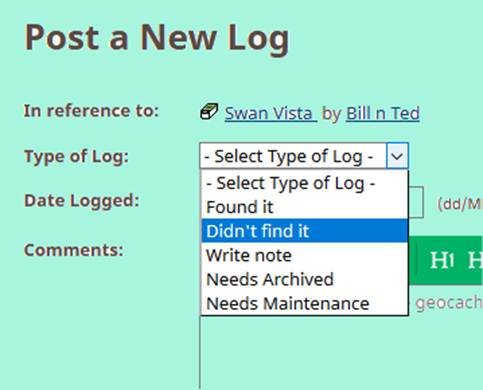
Didn’t find it If you
had a good look and couldn’t find it then this is the log to make. You didn’t
find it. Needs Maintenance If you
had a good look and couldn’t find *and*
others have also logged DNFs it then this is the log to make *as well as* logging a DNF. It has
probably gone missing. However if no one else has
logged a DNF then don’t log “Needs Miantenance”. I have lost count of the amount of
arrogant emails I’ve had from cachers telling me
that since they couldn’t find it the cache had gone only to do a maintenance
run and find the cache happily in place. Write note If you
didn’t get to the cache because the vicar was picnicking right on top of it,
or because you ran out of time then don’t put “DNF”. A “DNF” log
assumes you’ve actually had a good look. |
|
|
A
word of advice… You’ve not found the cache. That
does *NOT* mean it is not there.
Although you may well want to be helpful you should only ever replace a
missing cache with the express agreement of the cache owner. You should *never* replace a cache without
permission. Not only might the C.O. delete your “Found It” logs, the C.O. has every right to then delete the “Found It” logs of people subsequently finding your
throw-down. Personally I’m a great beleiver
in doing my homework. If you are going to go caching where there has been a
spate of DNF logs on a particular cache why not contact the C.O. and ask if
you can replace the cache for them. Maybe it is a tricky hide that people
cannot see? Maybe the C.O. is going to archive? Communication is the key
here. |
|